Luno Automated Trading - Bot Setup and Authentication

In this blog, we'll setup a Luno Trading bot.
The intention is to create a C# worker that will call the Luno Trading API using Basic Authentication.
Setup a repo
Go to the file location where you would like to create your repo and make a folder.
Open the folder with Powershell
git init
Create a dotnet worker
Create a folder for the worker:
mkdir src
cd ./src
mkdir PricingWorker
Create the default worker
dotnet new worker --name PricingWorker
We now have a basic worker application. Test it by running:
dotnet run
You should see something logging to console output.
Generate a C# client
Following from this blog, we can generate a C# client from the Luno API definition.
Navigate to the ./src directory running the below command:
cd ..
dotnet new console -o NSwag
cd NSwag
dotnet add package NSwag.CodeGeneration.CSharp
Copy the code in the linked blog post and modify the API definition path to be "swagger.json". Your Program.cs in the ./src/NSwag folder file should look like this:
using System;
using System.IO;
using System.Reflection;
using System.Threading.Tasks;
using NJsonSchema;
using NJsonSchema.Visitors;
using NSwag.CodeGeneration.CSharp;

namespace NSwag {
    class Program {
        static async Task Main(string[] args) {
            Console.WriteLine("Generating client...");
            await ClientGenerator.GenerateCSharpClient();
            Console.WriteLine("Generated client.");
        }
    }

    public static class ClientGenerator {

        public async static Task GenerateCSharpClient() =>
            GenerateClient(
                // https://github.com/OAI/OpenAPI-Specification/blob/main/examples/v2.0/json/petstore-simple.json
                document: await GetDocumentFromFile("swagger.json"),
                generatedLocation: "GeneratedClient.cs",
                generateCode: (OpenApiDocument document) => {
                    var settings = new CSharpClientGeneratorSettings();

                    var generator = new CSharpClientGenerator(document, settings);
                    var code = generator.GenerateFile();
                    return code;
                }
            );

        private static void GenerateClient(OpenApiDocument document, string generatedLocation, Func<OpenApiDocument, string> generateCode) {
            var root = Path.GetDirectoryName(Assembly.GetEntryAssembly().Location);
            var location = Path.GetFullPath(Path.Join(root, @"../../../", generatedLocation));

            Console.WriteLine($"Generating {location}...");

            var code = generateCode(document);

            System.IO.File.WriteAllText(location, code);
        }

        private static async Task<OpenApiDocument> GetDocumentFromFile(string swaggerJsonFilePath) {
            var root = Path.GetDirectoryName(Assembly.GetEntryAssembly().Location);
            var swaggerJson = await File.ReadAllTextAsync(Path.GetFullPath(Path.Join(root, swaggerJsonFilePath)));
            var document = await OpenApiDocument.FromJsonAsync(swaggerJson);

            return document;
        }
    }
}
Download the Luno API definition from here
Paste the "swagger.json" file you downloaded into the folder ./src/NSwag
Run the code client generation code using the below command (make sure you run the command from the ./src/NSwag directory):
dotnet run
You should notice a C# client in the ./src/NSwag folder called "GeneratedClient.cs".
Copy the GeneratedClient.cs to the folder ./src/PricingWorker/ApiClient
Change the namespace in the client to be:
namespace PricingWorker.ApiClients
Add the nuget package "NewtonSoft.Json" to your PricingWorker Project by running:
dotnet add package Newtonsoft.Json
Change back to the PricingWorker Directory
cd ../PricingWorker
Run the worker to see if it builds and runs
dotnet run
You should see console output in the powershell terminal.
We have now created a worker that has a class in it which has all the functionality we need to call the Luno API.
Call the Luno API
First things first is we need to generate an API key. Assuming you have a Luno account already, go to this link and create an API key. For now, give it readonly permissions.
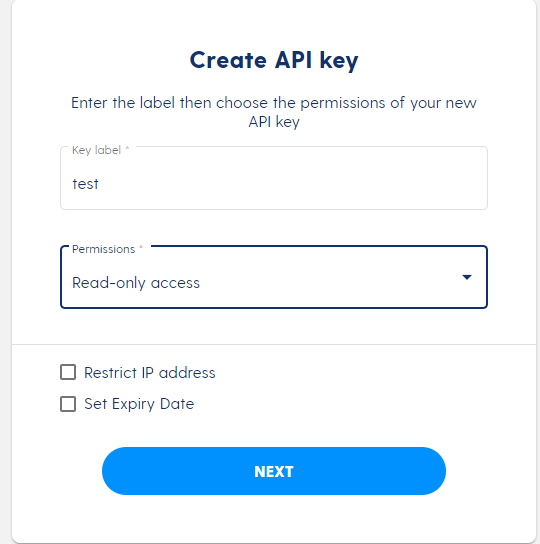
You should get a key and a secret - save these 2 values into your appsettings.json so it looks like so:
NB: We will not check this in to source control - it's just for testing purposes at this point
{
  "Logging": {
    "LogLevel": {
      "Default": "Information",
      "Microsoft.Hosting.Lifetime": "Information"
    }
  },
  "Luno": {
    "Key": "<Your Key>",
    "Secret": "<Your Secret>"
  }
}
We now have the means to authenticate our code to make calls under the identity of our Luno account. Let's integrate the security into our C# client.
In your GeneratedClient.cs, modify the constructor to take a key and secret parameter and add it to the client requests as a basic auth header as per below:
public Client(System.Net.Http.HttpClient httpClient, string key, string secret)
{
    _httpClient = httpClient;
    var authToken = Encoding.ASCII.GetBytes($"{key}:{secret}");
    _httpClient.DefaultRequestHeaders.Authorization = new AuthenticationHeaderValue("Basic",
            Convert.ToBase64String(authToken));
    _settings = new System.Lazy<Newtonsoft.Json.JsonSerializerSettings>(CreateSerializerSettings);
}
Now in the worker, instantiate the client and pass it the key and secret you saved in your appsettings.json earlier. Your worker class body should look like the following:
private readonly ILogger<Worker> _logger;
private readonly IConfiguration _config;

public Worker(ILogger<Worker> logger, IConfiguration config)
{
    _logger = logger;
    _config = config;
}

protected override async Task ExecuteAsync(CancellationToken stoppingToken)
{
    while (!stoppingToken.IsCancellationRequested)
    {
        _logger.LogInformation("Worker running at: {time}", DateTimeOffset.Now);

        using (var httpClient = new HttpClient())
        {
            var client = new Client(httpClient, _config["Luno:Key"], _config["Luno:Secret"]);

            var result = await client.MarketsAsync();

            Console.WriteLine($"Luno returned a response showing {result.Markets.Count} markets");
        }

        await Task.Delay(1000, stoppingToken);
    }
}
Now run the service and you should see something logged to your console as below:
Luno returned a response showing 29 markets
If you have not done things correctly, you will likely get an unauthorised response from this call.